- Cama-i, quyana tailuci!
- (Central Yup’ik)
- "Greetings, thank you for coming!"

DEED-Portal
DEED-Portal is a single-sign-on gateway to an increasing number of DEED resources. We're actively working to integrate more resources into DEED-Portal. Currently it supports single-sign-on for the following:
- • DEED-Collect data collection application
- • Alaska Developmental Profile (ADP)
- • Early Education Program Registration
Below are instructions for getting to resources via DEED-Portal.
Getting Into DEED-Portal
Accessing applications through DEED-Portal includes validation and is a multi-step process that may involve your (and your supervisor) replying to emails for confirmation. Here's how to proceed:
- Go to https://portal.education.alaska.gov
- Click either Microsoft or Google, depending on your district's platform:

- After accepting the single sign-on security prompt, you'll be presented with some fields. Fill in your Job Title, District (or organization) and any Additional Comments that may help us process your account, and click Submit.
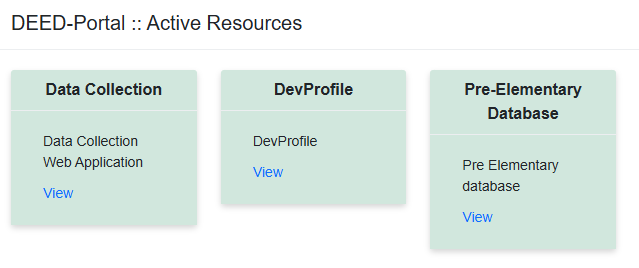
- Some accounts have been pre-provisioned. If yours has, you'll see resource cards you can click to proceed to the resource.
- If your account has not been pre-provisioned, you'll see a message indicating your account is "Awaiting Resources." It may take DEED staff time to process your new account, so either check back tomorrow, or follow the instructions on the screen.
- Once resources have been assigned to your account, when you login to DEED-Portal you'll see a card for each resource you have access to. For example:
If you run into any issues along the way, email eed.portal@alaska.gov.